How Bug Report works, in one minute.
Two ways to find a bug.
One way to fix it: replay it.
Whether a person found the bug or a test did, the developer gets the same thing: a report written for them, the evidence, and a Replay button that runs the steps again in their own browser.
Record a bug once. The report writes itself.
For QA testers, product people and anyone who finds bugs by hand, in a Chrome extension.
- Three ways to capture: a screenshot with markup, a recording of your steps, or steps plus video with your voice
- Every click, typed value, choice, drag, upload, date picker, iframe and new tab, written up as steps to reproduce
- Checks while you record: “this text should say…”, “this row should have…”, so the bug has a clear pass / fail
- Console, JavaScript errors and network requests with headers and bodies, in DevTools-style panels
- Passwords, card numbers and tokens never saved; private details blurred in videos and screenshots
- Send to your team workspace, share by link, Copy for AI, or let Claude / Cursor read it through MCP
Every failed Playwright test becomes a bug report.
For automation engineers. One line in playwright.config.ts, free and open source (MIT).
- A full test report: retries, steps with locators, errors with expected / received, screenshots, video, trace viewer
- Trends, flaky tests, failures grouped by cause, labels and a timeline of workers, the parts teams add Allure for
- Each failure turned into a bug: the test's steps, checks from your expects, console, network bodies and video
- Create bug report opens your dashboard filled in: pick a project and an assignee, done
- The developer replays the failed test's steps live in their own Chrome, no CI logs to dig through
- History kept next to the report (cache it in CI): nothing sent anywhere until you create a bug
From bug found to bug fixed,
without watching a single video.
Screen recordings are long and nobody wants to scrub through them. Bug Report swaps them for something you can actually run.
Record
QA tests the way they always do. Bug Report quietly captures every click, input and page change in the browser.
Review
The report is written for you: title, steps to reproduce, actual result and environment, with console and network attached. Add what you expected, edit anything, then send.
Replay
The developer hits play and the exact same actions run live in their own browser: Chrome, Edge or Brave.
Other tools hand developers a video.
We hand them the bug, running.
Live replay in the developer's own browser
Press Replay and every recorded click and typed value runs again, live, in their Chrome: with Pause, Back, Forward, 0.5x–2x, the checks turning green or red, and an answer at the end: Reproduced, Not reproduced or Inconclusive. DevTools stay open the whole time.
A failed test becomes a bug you can replay
Our Playwright reporter turns each failure into a bug report: the test's steps, your expects as checks, console, network bodies and video. One click puts it on the dashboard; the developer replays it in their browser instead of reading CI logs.
We checked Jam, Marker.io, BugHerd and Loom, and Playwright's report, Allure, ReportPortal and Currents (October 2026): none of them says it re-runs a reported bug in the developer's browser. See the full comparison.
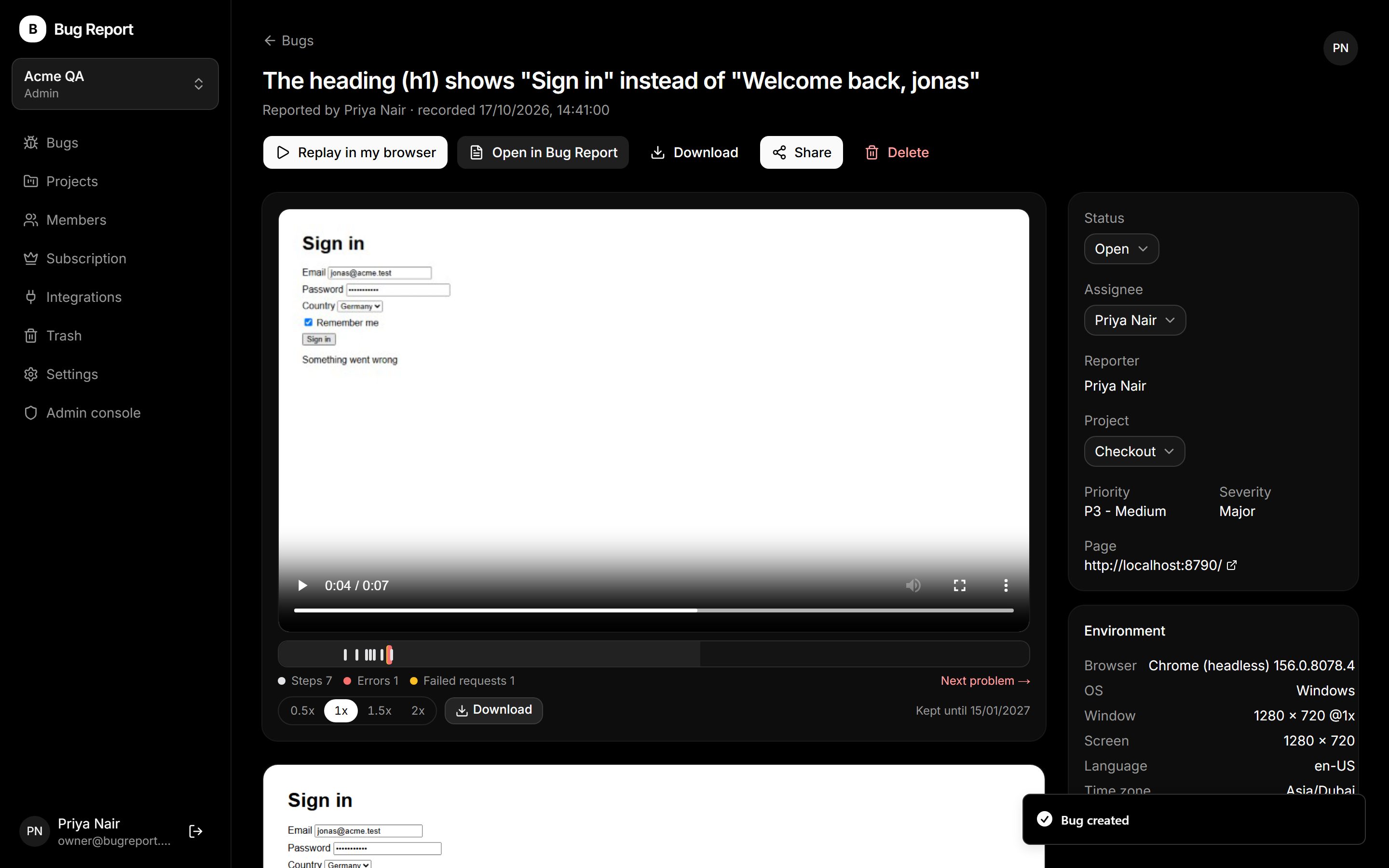
See it, not a mock-up.
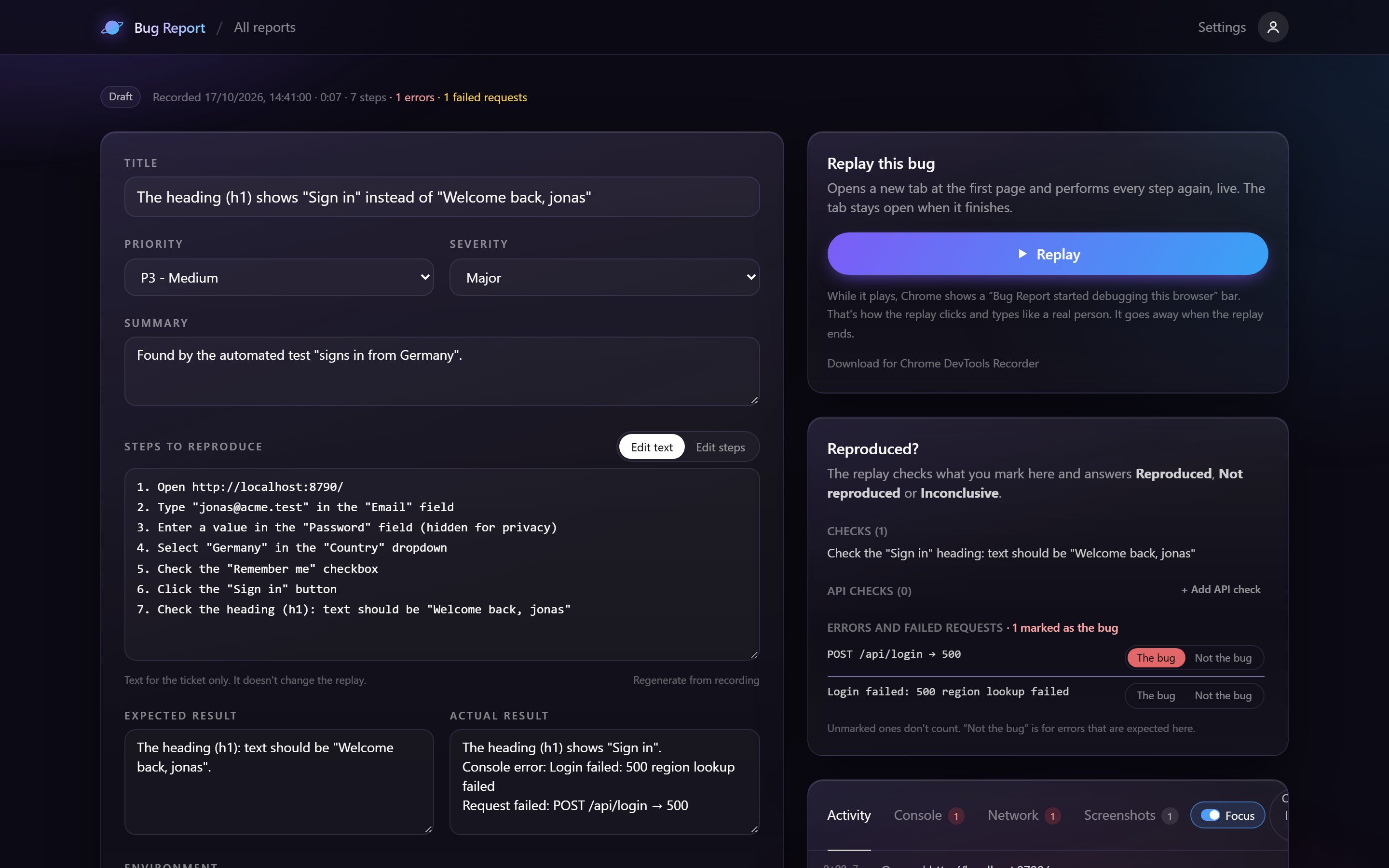
The bridge between
QA and developers.
Everything a developer needs to reproduce a bug, and nothing QA has to type by hand.
Reports that write themselves
Title, steps to reproduce and actual result written from what QA actually did, with console, network and environment attached.
Live replay, not video
Developers watch the bug happen in a real browser session instead of a 6-minute screen recording.
Chrome, Edge and Brave
Record and replay in Chrome and other Chromium browsers, on the developer's own machine. Reports and shared links open in any browser.
Environment captured
Browser, OS, screen size, URL and timing are attached automatically. No more “works on my machine”.
QA stays in control
Every report is reviewed and edited by QA before it is submitted. Nothing is sent on its own.
One link to share
Send a single link. The report and the replayable session travel together.
Clear pricing plans
that scale with you.
Screenshots, recorded steps and replay are free. Add video when your team wants to watch the bug too.
Screenshots, step recordings and live replay. Free for you and two teammates.
- Screenshots with markup and notes
- Record steps + live replay
- Console, network and environment
- Shared workspace (3 seats)
- Video: up to 2 min, no sound
- Video with voice, in the cloud
Per user / month. Everything in Free, plus video bug reports your developers can watch and replay.
- Everything in Free
- Videos up to 30 min
- Your voice and the tab's sound
- Steps, errors and requests on the video's timeline
- Instant replay of the last 5 minutes, with video
- Privacy blur, trim, MP4 / GIF export
For companies that need control, compliance and integrations.
- Everything in Pro
- Unlimited seats
- SSO and audit log (soon)
- Jira, Linear and GitHub (soon)
- Retention you choose
- Priority support
Questions, answered.
What is Bug Report?
Bug Report is a Chrome extension and team workspace for QA. You record a bug once; it writes the report (title, steps to reproduce, actual result, environment) and keeps the console logs, network requests, screenshots and an optional video. Developers press Replay and the same steps run live in their own browser.
How is a live replay different from a screen recording?
A screen recording is a video you have to watch and scrub through. A live replay performs every recorded click, typed value and page change again in the developer's own browser, step by step, with Back, Forward and Pause, so they can open DevTools and inspect the bug while it happens.
How is Bug Report different from Jam, Marker.io or BugHerd?
Those tools capture a bug well: a screenshot or video, and in some of them the console and network. Bug Report captures the same evidence, then goes one step further: the developer presses Replay and the recorded steps run again on the live site in their own browser, and checks QA added while recording say whether the bug is reproduced. The comparison page lists the differences row by row.
Which browsers does Bug Report work in?
Recording works in Google Chrome and in Chromium browsers such as Microsoft Edge and Brave. The report page, the shared links and the team dashboard work in any modern browser.
Does it capture console errors and network requests?
Yes. Every console message, JavaScript error and network request (method, status, headers, request and response bodies for fetch and XHR) is saved with the report, shown in a DevTools-style panel, with secrets such as auth headers, cookies and passwords removed before anything is saved.
Can my AI coding assistant fix the bug?
Yes. Copy for AI turns a report into a ready prompt, and the Bug Report MCP server lets Claude, Cursor or VS Code read your team's bugs with their steps, errors and failed requests, then update the status and comment when the fix is done.
Does Bug Report work with automated tests?
Yes, with Playwright. Add @bugreport/playwright to your config in one line and you get a full test report (retries, steps, errors, trace viewer, trends, flaky tests, failures by cause), and every failed test becomes a bug report with its steps, checks, console, network and video. Create bug report puts it on your dashboard, where the developer replays it in their own browser. The reporter is free and open source (MIT).
Is Bug Report free?
Yes. Screenshots, step recordings, live replay, console and network capture and a team workspace for three people are free. Pro adds 30-minute videos with voice and tab sound, instant replay with video, the video timeline and trimming to MP4 or GIF.
Is my data safe?
Reports stay on your computer until you send them to your team workspace. Passwords, card numbers and one-time codes are never recorded by default, secret headers and tokens are redacted, and private details can be blurred in videos and screenshots.
Stop watching bugs.
Start replaying them.
We're onboarding QA teams for the beta now. Tell us about yours and we'll get you set up.